Most productivity systems fail not because the tools are bad, but because the stack was built backwards. People find a tool they like, add it to an existing mess, and call it a system. Then they wonder why they still feel scattered despite paying for six subscriptions.
Building a stack that actually works means starting with your workflow — not the tools — and only then choosing what belongs in it.
START WITH YOUR WORKFLOW, NOT THE TOOLS
Before you open a single app, map out what actually happens in a typical work week. Where do ideas come from? How do you decide what to work on? When do you do your best thinking? Where do tasks go to die?
Most people discover the same few friction points: capturing ideas is scattered, prioritization is gut-feel, focus is fragile, and nothing gets reviewed. A well-built stack addresses each of these — specifically, not generically.
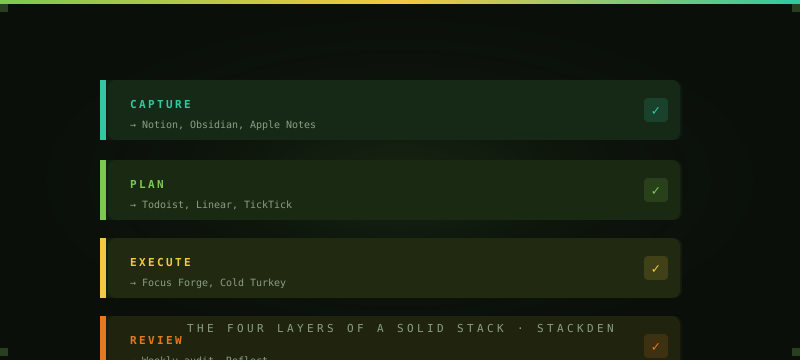
THE FOUR LAYERS OF A SOLID STACK
Layer 1 — Capture
Every idea, task, and piece of information needs to go somewhere instantly, with zero friction. This is the most important layer and the most neglected. If capture is hard, you'll lose things constantly and spend mental energy trying to remember them. The best capture tools are fast, available everywhere, and forgiving about structure. Notion, Obsidian, Apple Notes, or even a plain text file all work — the key is picking one and using it consistently.
Layer 2 — Plan
Capture feeds into planning. This is where you decide what actually gets done and when. Your planning tool should show you everything at a glance, let you prioritize quickly, and integrate with your calendar. Linear, Todoist, TickTick, and Asana all handle this well at different complexity levels. Don't over-engineer it — if you're a solo worker, a simple task list beats a full project management suite.
Layer 3 — Execute
Execution is where most stacks fall apart. You know what to do, you just can't stay focused long enough to do it. This is where tools like Focus Forge (StackDen's Pomodoro timer), noise apps like myNoise, and distraction blockers like Cold Turkey or Freedom earn their spot. One focused session beats three scattered hours — every time.
Layer 4 — Review
The layer almost nobody has. A weekly review forces you to clear the backlog, reassess priorities, and actually see what you accomplished. It closes the loop. Without it, your stack slowly fills with stale tasks and your capture layer stops feeling trustworthy. Even 20 minutes on Friday afternoon changes how you show up the following week.
SAGE'S RECOMMENDED STARTING STACK
For someone building their first real productivity stack, this covers all four layers without overwhelming complexity:
- Capture: Notion or Obsidian (free) for notes and ideas
- Plan: Todoist free tier for tasks, Google Calendar for time-blocking
- Execute: Focus Forge (free, right here on StackDen) for Pomodoro sessions
- Review: A recurring 20-minute Friday calendar block — no app required
RED FLAGS IN YOUR CURRENT STACK
Your stack has a problem if you're managing your tasks in more than two places. If you're regularly forgetting where something lives. If setup and maintenance takes longer than actually using the tools. If you feel more organized in theory than in practice. If any of these sound familiar, it's not a willpower problem — it's an architecture problem. Audit your stack before adding anything new.
THE ONE-MONTH AUDIT
Every 30 days, ask three questions: What am I using daily? What am I paying for but avoiding? What problem do I still have that my current stack doesn't solve? Cut the second category ruthlessly. The answer to the third is where your next tool — if any — belongs.
The goal isn't a perfect stack. It's a stack that gets out of your way and lets you do the actual work.
FIND THE RIGHT TOOLS FOR YOUR STACK
Browse 170+ curated AI tools, productivity apps, and software — filtered by category, price, and Sage's personal picks.
BROWSE THE DIRECTORY ▶